Templates & Tips for Writing Guides
This channel showcases many of the ways you can be more efficient when writing guides, whether that be through copy-able templates, code snippets or other tips.
It assumes you are using the PvME Guide Editor to write & live preview your guides.
Finding and using Templates
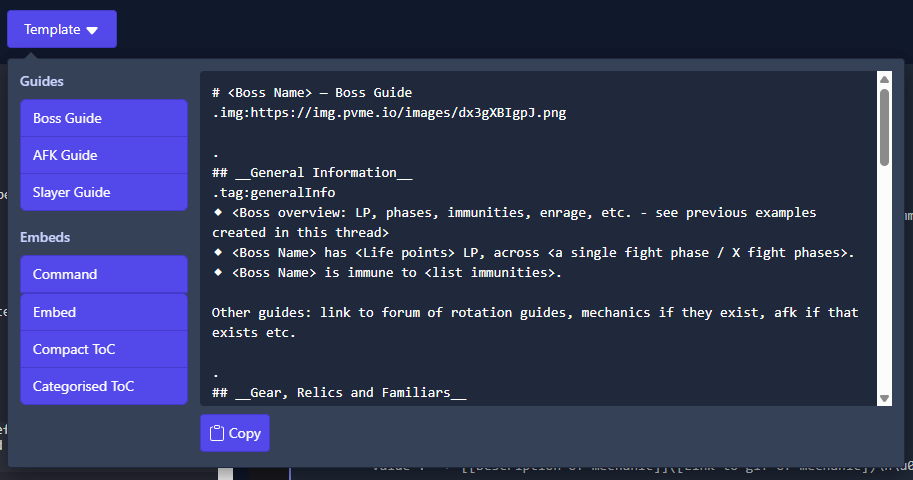
In the Guide Editor toolbar you will see a "Template" dropdown, containing starting points for our main guide types:
⬥ Boss Guide
⬥ AFK Guide
⬥ Slayer Guide
⬥ Command Embed
Simply click "copy" and paste these into the editor to get started on your guide, as in the screenshot below:
Finding emojis
There are two ways to find an emoji:
-
In the Guide Editor, simply start typing
:emojinameand it will bring up a list - select the one you want -
Search the full repository of emojis at https://pvme.io/pvme-settings/#emojis
Linking items to the Wiki
Many of our guides link items and gear to the RS Wiki. Follow these steps:
⬥ Use the pattern: [Item name](<http://runescape.wiki/w/Item_name>) <:emoji:>
• Wrap the URL in <> to prevent it showing a preview
• Most items only capitalise the first word
• Replace spaces with underscores
⬥ Test your URL in the guide editor by clicking on it
See the following example:
[Channeller's ring](<http://runescape.wiki/w/Channeller's_ring>) <:channellersring:839903943404027914>

Using Embeds
Sometimes we use a special Discord "embed" to format messages in a pretty way - these are written in JSON. When inside a JSON, common punctuation like bullets or new lines will not work as normal; use the following to achieve what you are looking for:
⬥ \n → adds a new line
⬥ \u00a0\u00a0\u00a0\u00a0 = adds a new line + 4 spaces
⬥ \n⬥ → adds a new line + a bullet
⬥ \n\u00a0\u00a0\u00a0\u00a0• → adds a new line + 4 spaces + a sub-bullet
⬥ \n\u200B → adds a blank line
A example embed can be seen below:
When rendered, the above code looks like the following;